# Serverless v2.0.0
serverless on steroids with semantic-release, automated continuous integration and automated deployments to Google Cloud Functions.
- **Author:** Patrick Heneise
- **Published:** 2018-03-23
- **Updated:** 2018-03-23
- **Tags:** continuous-integration, google-cloud-functions, semantic-versioning, deployment-pipelines, continuous-delivery
---
## ** Update **
A lot has happened since this article was written, so we published an update:
[**Serverless v3.0.0**](/articles/serverless-v3-0-0/)
## Introduction
The [serverless](https://serverless.com) framework is a great tool to bring more
structure into the Function as a Service (FaaS) world. I remember trying to
deploy a function to Google Cloud a few months ago, and without serverless and
it was a pain, I gave up. Now it’s as easy as installing the framework, get
credentials and deploy the function, done. There were a few hick-ups here and
there and I hope serverless will address those, not just their AWS support.
Coming from a service-oriented container world, the first thing we wanted to do
is automate our deployment and that was already harder than expected, even with
serverless. Second, we want to have semantic version numbers for maintainability
and to keep track of changes and compatibility.
Since we couldn’t find a complete guide on how to make this work, we decided to
put the information together here.
Requirements:
- Repository on GitHub
- [Travis Pro](http://travis-ci.com/) subscription for private repos, free for
public
- Google Cloud account (you need “Owner” permissions on the project!)
The first step is to set up the serverless repository, following the
[Quick Start Guide](https://serverless.com/framework/docs/providers/google/guide/quick-start/)
```bash
npm install -g serverless
serverless create --template google-nodejs --path my-service
cd my-service && npm install
```
Get your credentials from Google
[following these instructions](https://serverless.com/framework/docs/providers/google/guide/credentials/)
and instead of putting them in `~/.gcloud/keystore.json` copy the keystore
directly in the working repository. Don’t worry, it’s already on `.gitignore`
and won’t be commited. Update `serverless.yml` accordingly. We’ll just add some
default packages:
```bash
npm install standard tap semantic-release --save-dev
```
### Travis CI
This is already a working HelloWorld-App, so we’ll leave it there and continue
on deployment. Next step is [Travis CI](http://travis-ci.com/). For that we need
a valid test that can be executed, so we create `/test/bogus.js` :
```js
const test = require('tap').test
test('bogus', (assert) => {
assert.equal(true, true, 'bogus')
assert.end()
})
```
Here’s a complete example for the package.json including scripts for travis to
run tests:
With this package.json you can connect Travis with the repository, commit a
simple change and verify everything works correctly. The test should be green.
### Semantic-Release
If you don’t know Semantic-Release, checkout the
[readme](https://github.com/semantic-release/semantic-release) and
[documentation](https://github.com/semantic-release/semantic-release#documentation).
In short: semantic-release automatically increases the version number based on
your recent changes/commits. The easiest way to set this up is the CLI
```bash
npm install -g semantic-release-cli
semantic-release-cli setup
```
A few important things to follow:
- the `repository` attribute in your package.json must match the repo
- you need Admin permissions on GitHub for that repo
- the npm module name is available / the organisation is registered and you have
permissions to create a new module
Once the setup is complete, you will have a `.travis.yml` file that has all the
steps required for semantic-release. Make a small change on the code and push a
`fix: testing semrel` commit.
Travis should now create a new minor version number for you.
`semantic-release-cli` works great if you set up a single repo. If you want to
set up multiple repos at once, we’d advice to go to GitHub and NPM and get API
tokens manually. Store them somewhere safe and add `GH_TOKEN` and `NPM_TOKEN` on
the travis settings for each repo. That’s all semantic-release needs to work.
Make sure both tokens have publish permissions and access rights on the
repositories you want to deploy.
### Google Cloud Functions Deployment
In order to deploy anything to Google Cloud, Travis needs your keyfile. Here’s
why we need that in the project folder and not somewhere hidden in the home
folder.
First, install the `travis` command line tool. On macOS that’s simply done with
`brew install travis` and since it’s not a node module, this will take a little
while. Once installed, log in to your travis account: `travis login`.
While in the project folder, run:
```
travis encrypt-file keyfile.json --add
```
This will
[encrypt the keyfile](https://docs.travis-ci.com/user/encrypting-files/) and add
it to the travis.yml config. If you open the file, there should be a
`before_install` section with a `openssl aes-256-cbc....` command, this will
make the keyfile available to travis. Here’s the complete file:
If you have set the right permissions on Google Cloud, this *should
*automatically deploy your master branch to Google Cloud Functions, if the tests
work. The same time, you get a new release on GitHub.
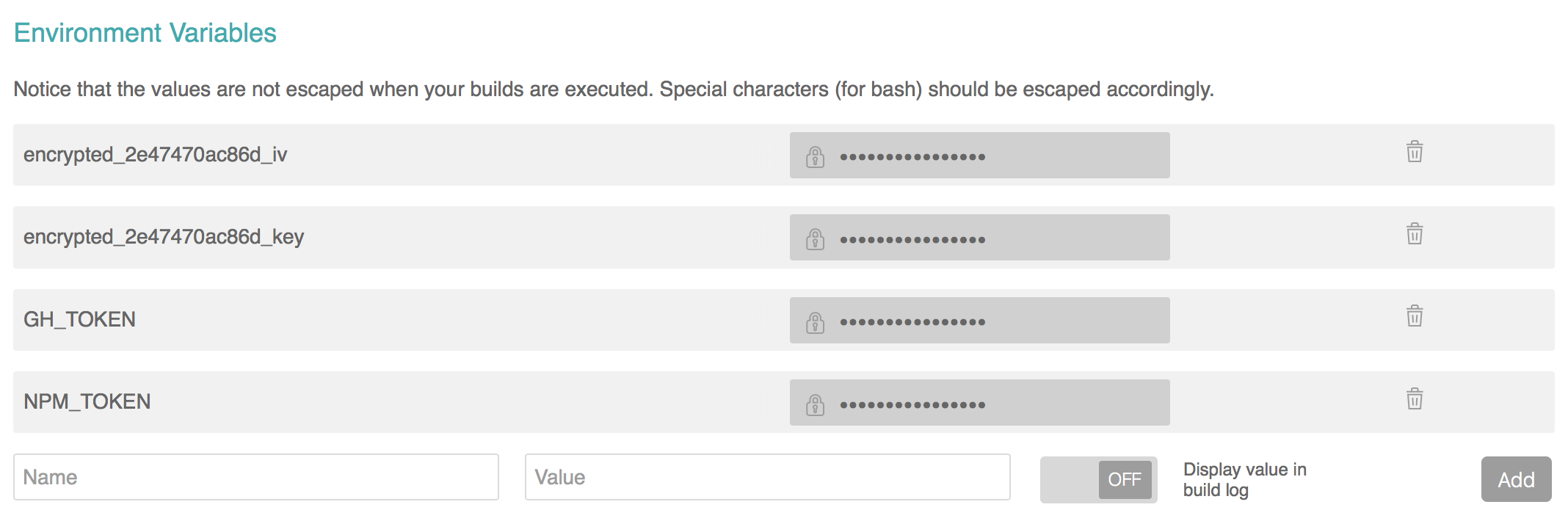
Verify in the Travis settings the encyrption keys are stored there as well as
the `GH_TOKEN` and `NPM_TOKEN:`
You can now experiment for example with
[build stages](https://github.com/semantic-release/semantic-release/blob/caribou/docs/recipes/travis-build-stages.md)
etc. to further improve the setup of deployment pipeline.
Inspired by
[https://medium.com/a-man-with-no-server/setting-up-a-ci-cd-pipeline-with-travis-ci-for-a-serverless-app-e98b0e57d30c](https://medium.com/a-man-with-no-server/setting-up-a-ci-cd-pipeline-with-travis-ci-for-a-serverless-app-e98b0e57d30c)
Enjoy your new deployment pipeline to Google Functions without
"Hauptversionsnummernerhöhungsangst" ( — Stephan Bönnemann).
Here’s a complete repo and the travis tests with all details
- [https://github.com/heneise/serverless-v2.0.0](https://github.com/heneise/serverless-v2.0.0)
- [https://travis-ci.org/heneise/serverless-v2.0.0](https://travis-ci.org/heneise/serverless-v2.0.0)
### Next steps
- instead of deploying the master branch, we’re looking into deploying a
specific tag
- how to promote tags from staging to production
If you have any questions or comments, please
[reach out on Bluesky](https://bsky.app/profile/zentered.co) or
[start a discussion on GitHub](https://github.com/zentered/zentered/discussions/new?category=ideas-feedback).